Proprietà CSS text-indent
Usa la proprietà CSS text-indent per impostare il rientro della prima riga di testo. Scopri i valori e guarda esempi pratici.
La proprietà CSS text-indent imposta la quantità di spazio vuoto prima della prima riga di un blocco di testo — il classico "rientro di paragrafo" che si vede nei libri stampati. Agisce solo sulla prima riga di ciascun elemento a livello di blocco; tutte le righe successive rimangono allineate al bordo del contenitore.
Per impostazione predefinita, il rientro viene aggiunto all'inizio della riga, seguendo la direzione di scrittura definita dalla proprietà direction — al bordo sinistro per il testo da sinistra a destra, e al bordo destro per il testo da destra a sinistra. Un valore negativo sposta la prima riga nella direzione opposta (a sinistra nel testo LTR), ed è il modo in cui si crea un rientro sporgente (hanging indent).
Perché e quando usarlo
- Rientri tipografici di paragrafo. Indentare la prima riga è il modo tradizionale per separare i paragrafi senza righe vuote tra di essi — comune negli articoli lunghi e nei layout stile libro.
- Rientri sporgenti. Un
text-indentnegativo abbinato a unpadding-leftcorrispondente mantiene la prima riga esterna e fa rientrare le righe successive — utile per bibliografie ed elenchi di definizioni. - Nascondere testo in modo accessibile. Il vecchio trucco
text-indent: -9999pxportava il testo fuori schermo pur mantenendolo leggibile per gli screen reader e i motori di ricerca (oggi largamente sostituito dalle classi di utilità visually-hidden).
text-indent è ereditata, quindi un valore impostato su un elemento padre si propaga ai contenitori di blocco figli a meno che non venga sovrascritto.
I valori "each-line" e "hanging" sono sperimentali.
| Valore iniziale | 0 |
|---|---|
| Si applica a | Contenitori a blocco. |
| Ereditata | Sì. |
| Animabile | Sì. text-indent è animabile. |
| Versione | CSS1 |
| Sintassi DOM | object.style.textIndent = "100px"; |
Sintassi
Sintassi della proprietà CSS text-indent
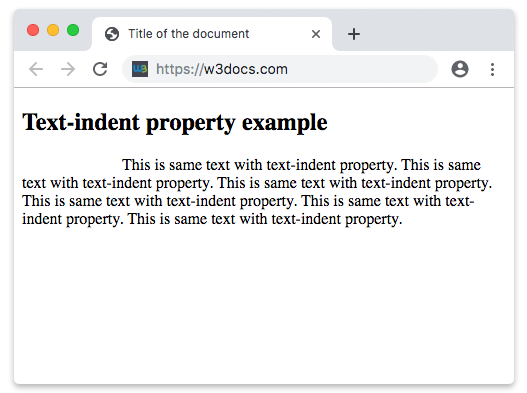
text-indent: length | percentage | each-line | hanging | initial | inherit;Esempio della proprietà text-indent:
Esempio della proprietà CSS text-indent con valore px
<!DOCTYPE html>
<html>
  <head>
    <title>Title of the document</title>
    <style>
      p {
        text-indent: 100px;
      }
    </style>
  </head>
  <body>
    <h2>Text-indent property example</h2>
    <p>
      This is same text with text-indent property. This is same text with text-indent property. This is same text with text-indent property. This is same text with text-indent property. This is same text with text-indent property. This is same text with text-indent property.
    </p>
  </body>
</html>Risultato
Esempio della proprietà text-indent specificata in "pt", "em", "%" e "cm":
Esempio della proprietà CSS text-indent con valori pt, cm, % e em
<!DOCTYPE html>
<html>
  <head>
    <title>Title of the document</title>
    <style>
      div.a {
        text-indent: 20pt;
      }
      div.b {
        text-indent: -5em;
      }
      div.c {
        text-indent: 70%;
      }
      div.d {
        text-indent: 4em;
      }
      div.e {
        text-indent: 5cm;
      }
    </style>
  </head>
  <body>
    <h2>Text-indent property example</h2>
    <h3>text-indent: 20pt</h3>
    <div class="a">
      Lorem Ipsum is simply dummy text of the printing and typesetting industry. Lorem Ipsum has been the industry's standard dummy text ever since the 1500s, when an unknown printer took a galley of type and scrambled it to make a type specimen book.
    </div>
    <h3>text-indent: -5em</h3>
    <div class="b">
      Lorem Ipsum is dummy text of the printing and typesetting industry. Lorem Ipsum has been the industry's standard dummy text ever since the 1500s when an unknown printer took a galley of type and scrambled it to make a type specimen book.
    </div>
    <h3>text-indent: 70%</h3>
    <div class="c">
      Lorem Ipsum is dummied text of the printing and typesetting industry. Lorem Ipsum has been the industry's standard dummy text ever since the 1500s when an unknown printer took a galley of type and scrambled it to make a type specimen book.
    </div>
    <h3>text-indent: 4em</h3>
    <div class="d">
      Lorem Ipsum is dummied text of the printing and typesetting industry. Lorem Ipsum has been the industry's standard dummy text ever since the 1500s when an unknown printer took a galley of type and scrambled it to make a type specimen book.
    </div>
    <h3>text-indent: 5cm</h3>
    <div class="e">
      Lorem Ipsum is dummied text of the printing and typesetting industry. Lorem Ipsum has been the industry's standard dummy text ever since the 1500s when an unknown printer took a galley of type and scrambled it to make a type specimen book.
    </div>
  </body>
</html>Creare un rientro sporgente
Un text-indent negativo abbinato a un padding-left corrispondente indenta tutte le righe tranne la prima — il pattern standard per riferimenti bibliografici e citazioni:
<!DOCTYPE html>
<html>
  <head>
    <title>Title of the document</title>
    <style>
      p.reference {
        text-indent: -2em;
        padding-left: 2em;
      }
    </style>
  </head>
  <body>
    <p class="reference">
      Knuth, Donald E. The Art of Computer Programming. Reading,
      Massachusetts: Addison-Wesley, 1968. This long entry wraps onto
      several lines so you can see the hanging indent in action.
    </p>
  </body>
</html>Valori percentuali
Quando si passa una percentuale, il rientro viene calcolato in base alla larghezza del blocco contenitore, non alla dimensione del carattere. Quindi text-indent: 10% su un contenitore largo 600px produce un rientro di 60px. Poiché il valore è relativo, il rientro cresce e si riduce al variare del layout, mantenendo la proporzionalità nelle pagine responsive.
Valori
| Valore | Descrizione | Prova |
|---|---|---|
| length | Specifica il rientro in px, pt, cm, em, ecc. Il valore predefinito è 0. Sono ammessi valori negativi. | Prova » |
| percentage | Specifica il rientro come percentuale della larghezza del blocco contenitore. | Prova » |
| each-line | Il rientro si applica alla prima riga e a ciascuna riga successiva a un'interruzione di riga forzata, ma non alle righe successive a un'interruzione di riga morbida. Questo valore è una tecnologia sperimentale. | |
| hanging | Inverte quali righe vengono indentate. La prima riga non viene indentata. Questo valore è una tecnologia sperimentale. | |
| initial | Imposta la proprietà al suo valore predefinito. | Prova » |
| inherit | Eredita la proprietà dall'elemento padre. |
Esercitati
Proprietà correlate
Per un controllo più preciso sulla spaziatura e sul flusso del testo, consulta questi capitoli correlati:
- text-align — allineamento orizzontale del testo all'interno del suo blocco.
- line-height — spaziatura verticale tra le righe.
- letter-spacing e word-spacing — spaziatura tra caratteri e parole.
- white-space — come vengono gestiti gli spazi bianchi e le interruzioni di riga.
- direction — la direzione di scrittura che determina da quale bordo parte
text-indent.