Proprietà CSS text-align-last
Usa la proprietà CSS text-align-last per impostare l'allineamento dell'ultima riga del testo. Scopri i valori e guarda esempi pratici.
La proprietà CSS text-align-last imposta l'allineamento dell'ultima riga di un blocco di testo — e soltanto l'ultima riga. È una delle proprietà CSS3 e funziona in combinazione con la comune proprietà text-align.
Quando si giustifica un paragrafo con text-align: justify, ogni riga viene allungata per riempire tutta la larghezza — eccetto l'ultima, che rimane corta e allineata all'inizio per impostazione predefinita. text-align-last è la proprietà che stabilisce cosa accade a quella riga finale "incompleta".
La proprietà agisce sull'ultima riga formattata del contenitore a blocchi a cui è applicata. Ad esempio, se un <div> contiene un lungo testo che va a capo, text-align-last stilizza la singola riga in fondo — le parole rimanenti che non hanno riempito una riga completa.
Questa proprietà è più evidente quando si usa text-align: justify e il testo va a capo su più righe. Su una singola riga di testo, l'ultima riga è l'unica riga, quindi si comporta in modo identico a text-align.
Quando utilizzarla
Ricorri a text-align-last quando il testo giustificato lascia un'ultima riga scomoda e vuoi avere più controllo su di essa:
justify— forza anche l'ultima riga a estendersi su tutta la larghezza, in modo che il paragrafo formi un blocco rettangolare uniforme (comune nei layout di stampa e nei poster).center— assegna a un blocco giustificato una riga finale centrata, spesso usata per titoli brevi o citazioni in evidenza.right/end— spinge l'ultima riga verso il bordo opposto per un effetto deliberatamente asimmetrico.
Poiché la proprietà è ereditata, impostarla una volta su un elemento contenitore la applica a tutti i contenitori a blocchi al suo interno, a meno che un elemento figlio non la sovrascriva.
| Valore iniziale | auto |
|---|---|
| Si applica a | Contenitori a blocchi. |
| Ereditata | Sì. |
| Animabile | No. |
| Versione | CSS3 |
| Sintassi DOM | object.style.textAlignLast = "left"; |
Compatibilità con i browser
| Browser | Supporto |
|---|---|
| Chrome | 50+ |
| Edge | 12+ |
| Firefox | 49+ |
| Safari | 10.1+ |
| Opera | 37+ |
Sintassi
Sintassi CSS di text-align-last
text-align-last: auto | left | right | center | justify | start | end | initial | inherit;Esempio della proprietà text-align-last:
Esempio di codice CSS text-align-last
<!DOCTYPE html>
<html>
  <head>
    <title>Title of the document</title>
    <style>
      .demo {
        text-align: justify;
        text-align-last: right;
      }
    </style>
  </head>
  <body>
    <h2>Text-align-last property example</h2>
    <h3>text-align-last: right:</h3>
    <div class="demo">
      Lorem Ipsum is dummy text of the printing and typesetting industry. Lorem Ipsum has been the industry's standard dummy text ever since the 1500s when an unknown printer took a galley of type and scrambled it to make a type specimen book. It has survived not only five centuries, but also the leap into electronic typesetting, remaining essentially unchanged. It was popularised in the 1960s with the release of Letraset sheets containing Lorem Ipsum passages, and more recently with desktop publishing software like Aldus PageMaker including versions of Lorem Ipsum.
    </div>
  </body>
</html>Risultato
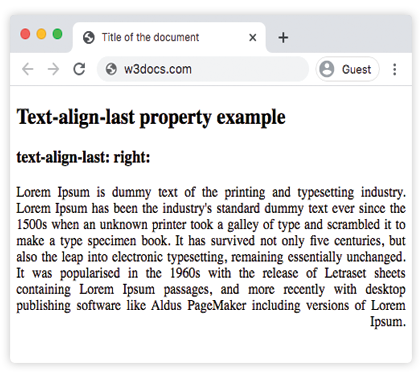
Esempio della proprietà text-align-last con i valori "start", "justify" e "center":
Esempio CSS text-align-last con tutti i valori
<!DOCTYPE html>
<html>
  <head>
    <title>Title of the document</title>
    <style>
      .demo1 {
        text-align: justify;
        text-align-last: start;
      }
      .demo2 {
        text-align: justify;
        text-align-last: center;
      }
      .demo3 {
        text-align: justify;
        text-align-last: justify;
      }
    </style>
  </head>
  <body>
    <h2>Text-align-last property example</h2>
    <h3>Text-align-last: start:</h3>
    <div class="demo1">
      Lorem Ipsum is dummy text of the printing and typesetting industry. Lorem Ipsum has been the industry's standard dummy text ever since the 1500s when an unknown printer took a galley of type and scrambled it to make a type specimen book. It has survived not only five centuries, but also the leap into electronic typesetting, remaining essentially unchanged. It was popularised in the 1960s with the release of Letraset sheets containing Lorem Ipsum passages, and more recently with desktop publishing software like Aldus PageMaker including versions of Lorem Ipsum.
    </div>
    <h3>Text-align-last: center:</h3>
    <div class="demo2">
      Lorem Ipsum is dummy text of the printing and typesetting industry. Lorem Ipsum has been the industry's standard dummy text ever since the 1500s when an unknown printer took a galley of type and scrambled it to make a type specimen book. It has survived not only five centuries, but also the leap into electronic typesetting, remaining essentially unchanged. It was popularised in the 1960s with the release of Letraset sheets containing Lorem Ipsum passages, and more recently with desktop publishing software like Aldus PageMaker including versions of Lorem Ipsum.
    </div>
    <h3>Text-align-last: justify:</h3>
    <div class="demo3">
      Lorem Ipsum is dummy text of the printing and typesetting industry. Lorem Ipsum has been the industry's standard dummy text ever since the 1500s when an unknown printer took a galley of type and scrambled it to make a type specimen book. It has survived not only five centuries, but also the leap into electronic typesetting, remaining essentially unchanged. It was popularised in the 1960s with the release of Letraset sheets containing Lorem Ipsum passages, and more recently with desktop publishing software like Aldus PageMaker including versions of Lorem Ipsum.
    </div>
  </body>
</html>Esempio della proprietà text-align-last con il valore "end":
Si noti che text-align-last è applicata al <div> contenitore, ma ogni <p> al suo interno è un proprio contenitore a blocchi — quindi l'allineamento end agisce sull'ultima riga di ogni paragrafo, non solo sull'ultimo paragrafo del gruppo.
<!DOCTYPE html>
<html>
  <head>
    <title>Title of the document</title>
    <style>
      .demo {
        text-align: justify;
        text-align-last: end;
      }
    </style>
  </head>
  <body>
    <h2>Text-align-last property example</h2>
    <h3>text-align-last: end:</h3>
    <div class="demo">
      <p>
        Lorem Ipsum is dummy text of the printing and typesetting industry. Lorem Ipsum has been the industry's standard dummy text ever since the 1500s when an unknown printer took a galley of type and scrambled it to make a type specimen book. It has survived not only five centuries, but also the leap into electronic typesetting, remaining essentially unchanged. It was popularised in the 1960s with the release of Letraset sheets containing Lorem Ipsum passages, and more recently with desktop publishing software like Aldus PageMaker including versions of Lorem Ipsum.
      </p>
      <p>
        Lorem Ipsum is dummy text of the printing and typesetting industry. Lorem Ipsum has been the industry's standard dummy text ever since the 1500s when an unknown printer took a galley of type and scrambled it to make a type specimen book. It has survived not only five centuries, but also the leap into electronic typesetting, remaining essentially unchanged.
      </p>
      <p>
        Lorem Ipsum is dummy text of the printing and typesetting industry. Lorem Ipsum has been the industry's standard dummy text ever since the 1500s when an unknown printer took a galley of type and scrambled it to make a type specimen book.
      </p>
    </div>
  </body>
</html>Valori
| Valore | Descrizione |
|---|---|
| auto | Usa il valore della proprietà text-align. Questo è il valore predefinito. |
| left | Allinea l'ultima riga a sinistra. |
| right | Allinea l'ultima riga a destra. |
| center | Allinea l'ultima riga al centro. |
| justify | L'ultima riga viene giustificata come le altre righe. |
| start | L'ultima riga è allineata all'inizio della riga. A sinistra se la direzione è da sinistra a destra, a destra se la direzione è da destra a sinistra. |
| end | L'ultima riga è allineata alla fine della riga. A destra se la direzione è da sinistra a destra, a sinistra se la direzione è da destra a sinistra. |
| initial | Imposta la proprietà al suo valore predefinito. |
| inherit | Eredita la proprietà dall'elemento genitore. |
Esercizio
Proprietà correlate
text-align— allinea tutte le righe di un blocco di testo.text-justify— controlla come viene distribuito lo spazio quando il testo è giustificato.direction— imposta la direzione del testo, che determina il significato distarteend.