Proprietà CSS overflow
La proprietà CSS overflow definisce il comportamento del contenuto nel box. Valori, esempi e utilizzo pratico.
La proprietà CSS overflow controlla cosa succede quando il contenuto di un elemento è troppo grande per stare nel suo box. Si può scegliere se il contenuto in eccesso viene semplicemente ritagliato, mostrato comunque o reso scorrevole.
L'overflow diventa visibile solo quando il box ha una dimensione vincolata. Il modo più comune per vincolarlo è impostare un height fisso (e opzionalmente un width), ma un box può anche essere vincolato da un layout flex o grid. Se il box può crescere liberamente per adattarsi al contenuto, non c'è nulla che possa traboccare e la proprietà non ha effetto visibile.
overflow è una proprietà abbreviata che imposta contemporaneamente due proprietà longhand:
- overflow-x — controlla il ritaglio sull'asse sinistro/destro (orizzontale).
- overflow-y — controlla il ritaglio sull'asse superiore/inferiore (verticale).
Quando si assegna a overflow un solo valore, entrambi gli assi lo ricevono. Con due valori, il primo si applica a overflow-x e il secondo a overflow-y (ad esempio overflow: hidden scroll;).
Panoramica dei valori
La proprietà overflow accetta le seguenti parole chiave:
visible— valore predefinito. Il contenuto non viene ritagliato; fuoriesce dal box e si sovrappone a ciò che gli sta accanto.hidden— il contenuto che non rientra viene ritagliato e diventa invisibile. Non viene offerta nessuna barra di scorrimento, quindi la parte nascosta è irraggiungibile dall'utente.scroll— il contenuto viene ritagliato e le barre di scorrimento sono sempre mostrate (anche quando tutto il contenuto è visibile), il che evita spostamenti nel layout.auto— il contenuto viene ritagliato e le barre di scorrimento compaiono solo quando necessario. Questa è la scelta più comune per i pannelli scorrevoli.overlay— comeauto, ma le barre di scorrimento vengono disegnate sopra il contenuto invece di occupare spazio.
Il valore overlay è deprecato e non dovrebbe essere utilizzato. Usa auto al suo posto — i browser moderni possono disegnare barre di scorrimento in stile overlay in base alle impostazioni del sistema operativo dell'utente.
Scegliere un valore
- Usa
autoper una regione scorrevole (pannelli chat, blocchi di codice, finestre modali) — le barre di scorrimento compaiono solo se il contenuto effettivamente trabocca. - Usa
hiddenper ritagliare il contenuto deliberatamente, per ritagliare un'immagine con angoli arrotondati, o per contenere i float (vedi sotto). Ricorda che il contenuto ritagliato diventa inaccessibile all'utente, quindi non nascondere nulla di cui l'utente abbia bisogno. - Usa
scrollquando vuoi un gutter riservato per la barra di scorrimento in modo che il layout non salti al variare del contenuto. - Lascialo come
visiblequando l'overflow va bene, ad esempio per un tooltip o un menu a tendina che si estende intenzionalmente oltre il proprio contenitore.
Due utili effetti collaterali
Contenimento dei float. Impostando overflow su qualsiasi valore diverso da visible, l'elemento cresce abbastanza da avvolgere i figli con float. Quindi un elemento padre con overflow: hidden (o auto) e senza altezza dichiarata si estenderà per includere il contenuto con float al suo interno. Nota che questo non pulisce il float — lo contiene soltanto. (L'alternativa moderna è display: flow-root, che fa la stessa cosa senza gli effetti collaterali del ritaglio.)
Creazione di un block formatting context (BFC). Un valore overflow diverso da visible avvia un nuovo block formatting context. Questo è utile quando si vuole che un elemento block si posizioni ordinatamente accanto a un elemento con float invece di scorrere sotto di esso.
| Valore iniziale | visible |
|---|---|
| Si applica a | Contenitori block, contenitori flex e contenitori grid. |
| Ereditato | No. |
| Animabile | No. |
| Versione | CSS2 |
| Sintassi DOM | Object.style.overflow = "auto"; |
Sintassi
Sintassi CSS overflow
overflow: visible | hidden | scroll | auto | overlay | initial | inherit;Esempio della proprietà overflow con il valore "visible"
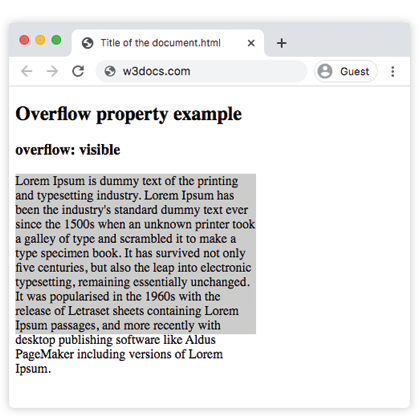
Con visible, il testo del paragrafo supera il fondo del box da 200px invece di essere tagliato — il comportamento predefinito.
Esempio di codice CSS overflow
<!DOCTYPE html>
<html>
  <head>
    <style>
      p {
        background-color: #ccc;
        width: 300px;
        height: 200px;
        overflow: visible;
      }
    </style>
  </head>
  <body>
    <h2>Overflow property example</h2>
    <h3>overflow: visible</h3>
    <p>Lorem Ipsum is dummy text of the printing and typesetting industry. Lorem Ipsum has been the industry's standard dummy text ever since the 1500s when an unknown printer took a galley of type and scrambled it to make a type specimen book. It has survived not only five centuries, but also the leap into electronic typesetting, remaining essentially unchanged. It was popularised in the 1960s with the release of Letraset sheets containing Lorem Ipsum passages, and more recently with desktop publishing software like Aldus PageMaker including versions of Lorem Ipsum.</p>
  </body>
</html>Risultato
Esempio della proprietà overflow con il valore "scroll"
Con scroll, entrambe le barre di scorrimento compaiono indipendentemente dalla necessità, e il testo in eccesso diventa raggiungibile scorrendo.
Esempio CSS overflow scroll
<!DOCTYPE html>
<html>
  <head>
    <style>
      p {
        background-color: #ccc;
        width: 300px;
        height: 200px;
        overflow: scroll;
      }
    </style>
  </head>
  <body>
    <h2>Overflow property example</h2>
    <h3>overflow: scroll</h3>
    <p>Lorem Ipsum is simply dummy text of the printing and typesetting industry. Lorem Ipsum has been the industry's standard dummy text ever since the 1500s when an unknown printer took a galley of type and scrambled it to make a type specimen book. It has survived not only five centuries, but also the leap into electronic typesetting, remaining essentially unchanged. It was popularised in the 1960s with the release of Letraset sheets containing Lorem Ipsum passages, and more recently with desktop publishing software like Aldus PageMaker including versions of Lorem Ipsum.</p>
  </body>
</html>Esempio della proprietà overflow con il valore "hidden"
Con hidden, il testo che non rientra viene ritagliato e non viene mostrata nessuna barra di scorrimento, quindi la parte tagliata non è raggiungibile.
Esempio CSS overflow hidden
<!DOCTYPE html>
<html>
  <head>
    <style>
      p {
        background-color: #ccc;
        width: 300px;
        height: 200px;
        overflow: hidden;
      }
    </style>
  </head>
  <body>
    <h2>Overflow property example</h2>
    <h3>overflow: hidden</h3>
    <p>Lorem Ipsum is dummy text of the printing and typesetting industry. Lorem Ipsum has been the industry's standard dummy text ever since the 1500s when an unknown printer took a galley of type and scrambled it to make a type specimen book. It has survived not only five centuries, but also the leap into electronic typesetting, remaining essentially unchanged. It was popularised in the 1960s with the release of Letraset sheets containing Lorem Ipsum passages, and more recently with desktop publishing software like Aldus PageMaker including versions of Lorem Ipsum.</p>
  </body>
</html>Esempio della proprietà overflow con il valore "auto"
auto è il valore più pratico: la barra di scorrimento compare solo sull'asse che effettivamente trabocca. Questo esempio mostra anche come overflow-x e overflow-y possono essere impostati in modo indipendente.
CSS overflow auto
<!DOCTYPE html>
<html>
  <head>
    <title>Title of the document</title>
    <style>
      .scroll {
        width: 200px;
        height: 300px;
        border: 1px solid;
        overflow: auto;
        margin-bottom: 10px;
      }
      .scroll-x {
        width: 200px;
        height: 300px;
        border: 1px solid;
        overflow-x: auto;
        overflow-y: hidden;
        margin-bottom: 10px;
      }
      .scroll-y {
        width: 200px;
        height: 300px;
        border: 1px solid;
        overflow-y: auto;
        margin-bottom: 10px;
      }
      .scroll>div {
        width: 400px;
        height: 50px;
        background: #ccc;
      }
      .scroll-y>div {
        width: 200px;
        height: 50px;
        background: #ccc;
      }
      .scroll-x>div {
        width: 400px;
        height: 50px;
        background: #ccc;
        overflow: hidden;
      }
    </style>
  </head>
  <body>
    <h1>Example with Overflow Property</h1>
    <h2>overflow overflow scroll auto</h2>
    <div class="scroll">
      <h2>Overflow Property </h2>
      <div>
        <h2>overflow scroll property</h2>
      </div>
      <p>
        Lorem Ipsum is dummy text of the printing and typesetting industry. Lorem Ipsum has been the industry's standard dummy text ever since the 1500s when an unknown printer took a galley of type and scrambled it to make a type specimen book. It has survived not only five centuries, but also the leap into electronic typesetting, remaining essentially unchanged. It was popularised in the 1960s with the release of Letraset sheets containing Lorem Ipsum passages, and more recently with desktop publishing software like Aldus PageMaker including versions of Lorem Ipsum.
      </p>
    </div>
    <h2>overflow overflow-x auto</h2>
    <div class="scroll-x">
      <h2>Overflow Property </h2>
      <div>
        <h2>overflow scroll-x property</h2>
      </div>
      <p>
        Lorem Ipsum is dummy text of the printing and typesetting industry. Lorem Ipsum has been the industry's standard dummy text ever since the 1500s when an unknown printer.
      </p>
    </div>
    <h2>overflow overflow-y auto</h2>
    <div class="scroll-y">
      <h2>Overflow Property </h2>
      <div>
        <h2>overflow scroll-y property</h2>
      </div>
      <p>
        Lorem Ipsum is dummy text of the printing and typesetting industry. Lorem Ipsum has been the industry's standard dummy text ever since the 1500s when an unknown printer took a galley of type and scrambled it to make a type specimen book. software like Aldus PageMaker including versions of Lorem Ipsum.but also the leap into electronic typesetting, remaining essentially unchanged. It was popularised in the 1960s with the release of Letraset sheets containing Lorem Ipsum passages, and more recently with desktop publishing software like Aldus PageMaker including versions of Lorem Ipsum.
      </p>
    </div>
  </body>
</html>Esempio della proprietà overflow con tutti i valori
Questo esempio inserisce lo stesso testo in cinque box per confrontare ogni valore fianco a fianco.
Esempio CSS overflow con tutti i valori
<!DOCTYPE html>
<html>
  <head>
    <title>Title of the document</title>
    <style>
      div.scroll {
        background-color: #eee;
        width: 300px;
        height: 200px;
        overflow: scroll;
      }
      div.hidden {
        background-color: #eee;
        width: 300px;
        height: 200px;
        overflow: hidden;
      }
      div.auto {
        background-color: #eee;
        width: 300px;
        height: 200px;
        overflow: auto;
      }
      div.visible {
        background-color: #eee;
        width: 300px;
        height: 200px;
        overflow: visible;
      }
      div.overlay {
        background-color: #eee;
        width: 300px;
        height: 200px;
        overflow: overlay;
      }
    </style>
  </head>
  <body>
    <h2>Overflow property example</h2>
    <h3>overflow: scroll</h3>
    <div class="scroll">
      Lorem Ipsum is dummy text of the printing and typesetting industry. Lorem Ipsum has been the industry's standard dummy text ever since the 1 500s when an unknown printer took a galley of type and scrambled it to make a type specimen book. It has survived not only five centuries, but also the leap into electronic typesetting, remaining essentially unchanged. It was popularised in the 1960s with the release of Letraset sheets containing Lorem Ipsum passages, and more recently with desktop publishing software like Aldus PageMaker including versions of Lorem Ipsum.
    </div>
    <h3>overflow: hidden</h3>
    <div class="hidden">
      Lorem Ipsum is the dummying text of the printing and typesetting industry. Lorem Ipsum has been the industry's standard dummy text ever since the 1500s when an unknown printer took a galley of type and scrambled it to make a type specimen book. It has survived not only five centuries, but also the leap into electronic typesetting, remaining essentially unchanged. It was popularised in the 1960s with the release of Letraset sheets containing Lorem Ipsum passages, and more recently with desktop publishing software like Aldus PageMaker including versions of Lorem Ipsum.
    </div>
    <h3>overflow: auto</h3>
    <div class="auto">
      Lorem Ipsum is the dummying text of the printing and typesetting industry. Lorem Ipsum has been the industry's standard dummy text ever since the 1500s when an unknown printer took a galley of type and scrambled it to make a type specimen book. It has survived not only five centuries, but also the leap into electronic typesetting, remaining essentially unchanged. It was popularised in the 1960s with the release of Letraset sheets containing Lorem Ipsum passages, and more recently with desktop publishing software like Aldus PageMaker including versions of Lorem Ipsum.
    </div>
    <h3>overflow: visible</h3>
    <div class="visible">
      Lorem Ipsum is the dummying text of the printing and typesetting industry. Lorem Ipsum has been the industry's standard dummy text ever since the 1500s when an unknown printer took a galley of type and scrambled it to make a type specimen book. It has survived not only five centuries, but also the leap into electronic typesetting, remaining essentially unchanged. It was popularised in the 1960s with the release of Letraset sheets containing Lorem Ipsum passages, and more recently with desktop publishing software like Aldus PageMaker including versions of Lorem Ipsum.
    </div>
    <br />
    <br />
    <h3>overflow: overlay</h3>
    <div class="overlay">
      Lorem Ipsum is the dummying text of the printing and typesetting industry. Lorem Ipsum has been the industry's standard dummy text ever since the 1500s when an unknown printer took a galley of type and scrambled it to make a type specimen book. It has survived not only five centuries, but also the leap into electronic typesetting, remaining essentially unchanged. It was popularised in the 1960s with the release of Letraset sheets containing Lorem Ipsum passages, and more recently with desktop publishing software like Aldus PageMaker including versions of Lorem Ipsum.
    </div>
  </body>
</html>Valori
| Valore | Descrizione | Prova |
|---|---|---|
| visible | Il contenuto non viene ritagliato e viene renderizzato fuori dal padding box. Questo è il valore predefinito di questa proprietà. | Prova » |
| hidden | Il contenuto viene ritagliato per adattarsi al padding box. | Prova » |
| scroll | Viene aggiunta la barra di scorrimento per vedere il resto del contenuto. | Prova » |
| auto | Dipende dal browser. Se il contenuto trabocca, viene aggiunta la barra di scorrimento. | Prova » |
| overlay | Funziona come auto, ma con le barre di scorrimento disegnate sopra il contenuto invece di occupare spazio. Questo valore deprecato non deve essere più utilizzato, sebbene possa ancora funzionare. | Prova » |
| initial | Imposta la proprietà al suo valore predefinito. | Prova » |
| inherit | Eredita la proprietà dal suo elemento padre. |
Proprietà correlate
- overflow-x e overflow-y — impostano il ritaglio per asse.
- white-space — abbina
nowrapconoverflow: hiddenper mantenere il testo su una riga prima di ritagliarlo. - display —
display: flow-rootcontiene i float senza gli effetti collaterali del ritaglio dioverflow.