Proprietà CSS margin-left
La proprietà CSS margin-left definisce lo spazio del margine sinistro di un elemento. Scopri i valori e guarda esempi pratici.
La proprietà margin-left imposta la larghezza del margine sinistro.
Quando la somma di width, margin-left, border, padding, l'area del contenuto e margin-right supera la larghezza del contenitore, i margini diventano auto.
La proprietà margin-left è definita come la parola chiave <auto>, <percentage> oppure come <length>. Il suo valore può essere negativo, positivo o zero.
Informazione
Sono ammessi valori negativi.
| Valore iniziale | 0 |
|---|---|
| Si applica a | Tutti gli elementi. Si applica anche a ::first-letter. |
| Ereditata | No. |
| Animabile | Sì. Il margine sinistro dell'elemento è animabile. |
| Versione | CSS2 |
| Sintassi DOM | object.style.marginLeft = "20px"; |
Sintassi
Sintassi della proprietà CSS margin-left
margin-left: auto | <length> | <percentage> | initial | inherit;Esempio della proprietà margin-left definita come "px":
Esempio della proprietà CSS margin-left con valore px
<!DOCTYPE html>
<html>
  <head>
    <title>Title of the document</title>
    <style>
      .left {
        margin-left: 25px;
      }
    </style>
  </head>
  <body>
    <h2>Margin-left property example</h2>
    <p>Lorem Ipsum is simply dummy text of the printing and typesetting industry.</p>
    <p class="left">Lorem Ipsum is simply dummy text of the printing and typesetting industry.</p>
  </body>
</html>Risultato
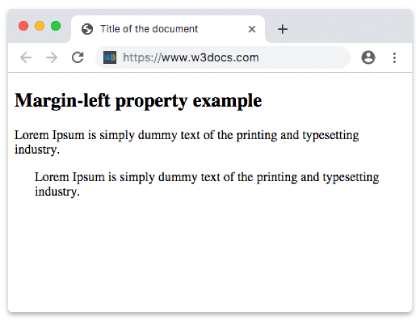
Esempio della proprietà margin-left definita come "em":
Esempio della proprietà CSS margin-left con valore em
<!DOCTYPE html>
<html>
  <head>
    <title>Title of the document</title>
    <style>
      .left {
        margin-left: 8em;
      }
    </style>
  </head>
  <body>
    <h2>Margin-left property example</h2>
    <p>Lorem Ipsum is simply dummy text of the printing and typesetting industry.</p>
    <p class="left">Lorem Ipsum is simply dummy text of the printing and typesetting industry.</p>
  </body>
</html>Esempio della proprietà margin-left definita come "px", "em" e "%":
Esempio della proprietà CSS margin-left con valori em, px e %
<!DOCTYPE html>
<html>
  <head>
    <title>Title of the document</title>
    <style>
      p.p1 {
        margin-left: 6em;
      }
      p.p2 {
        margin-left: 40px;
      }
      p.p3 {
        margin-left: 10%;
      }
    </style>
  </head>
  <body>
    <h2>Margin-left property example</h2>
    <p>No specified margin.</p>
    <p class="p1"> Left margin is set to 6em.</p>
    <p class="p2">Left margin is set to 40px.</p>
    <p class="p3">Left margin is set to 10%.</p>
    <p>No specified margin</p>
  </body>
</html>Valori
| Valore | Descrizione | Prova |
|---|---|---|
| auto | Imposta il margine sinistro. È il valore predefinito di questa proprietà. | Prova » |
| length | Definisce un margine sinistro in px, pt, cm, ecc. Il valore predefinito è 0. | Prova » |
| % | Imposta il margine sinistro in percentuale rispetto all'elemento contenitore. | Prova » |
| initial | Fa sì che la proprietà utilizzi il suo valore predefinito. | Prova » |
| inherit | Eredita la proprietà dall'elemento genitore. |
Esercizio
Pratica
Cosa specifica la proprietà 'margin-left' in CSS?
Was this page helpful?