CSS :first-child Pseudo Classe
La pseudo-classe CSS :first-child seleziona il primo figlio del suo genitore. Scopri sintassi, errori comuni ed esempi pratici.
La pseudo-classe CSS :first-child corrisponde a un elemento che è il primo figlio del suo genitore. Viene usata più spesso per stilizzare il primo elemento di un elenco, il primo paragrafo di una sezione, o per rimuovere il margine superiore/bordo dal primo elemento di un gruppo.
Questa pagina tratta la sintassi, l'errore comune che confonde la maggior parte delle persone, diversi esempi interattivi e le differenze tra :first-child e i suoi stretti parenti.
L'insidia: "primo figlio" non significa "primo di quel tipo"
Un selettore come p:first-child non significa "il primo <p> all'interno del genitore." Significa "un <p> che è anche il primissimo figlio del suo genitore." Se un elemento diverso precede il paragrafo, la regola non corrisponde a nulla.
<div>
<h2>Heading</h2>
<p>This paragraph is NOT styled — the <h2> is the first child.</p>
</div>
<div>
<p>This paragraph IS styled — it is the first child of its <div>.</p>
</div>Quindi p:first-child si legge da destra a sinistra come: seleziona <p>, ma solo quando quel <p> è il primo figlio del suo genitore. Quando vuoi "il primo paragrafo indipendentemente da ciò che lo precede", usa invece :first-of-type.
:first-child vs. selettori correlati
| Selettore | Corrisponde a |
|---|---|
:first-child | Un elemento che è il primo figlio del suo genitore |
:last-child | Un elemento che è l'ultimo figlio del suo genitore |
:first-of-type | Il primo elemento del suo tipo tra i suoi fratelli |
:only-child | Un elemento che è il solo figlio del suo genitore |
:nth-child(n) | L'ennesimo figlio, con qualsiasi formula (2n, 3n+1, ecc.) |
:first-child è equivalente a :nth-child(1). La differenza principale rispetto a :first-of-type è la condizione: :first-child corrisponde solo se l'elemento è il primo figlio del suo genitore, mentre :first-of-type corrisponde al primo elemento del suo tipo specifico tra i fratelli — indipendentemente da ciò che lo precede.
Versione
Sintassi
Esempio di sintassi CSS :first-child
:first-child {
  css declarations;
}Esempi
Con il tag <p>
Qui il primo <p> è il primo figlio di <body>, quindi viene stilizzato. Il secondo <p> segue un <h2>, quindi non lo è.
Esempio di codice CSS :first-child
<!DOCTYPE html>
<html>
  <head>
    <title>Title of the document</title>
    <style>
      p:first-child {
        background-color: #1c87c9;
        color: #fff;
      }
    </style>
  </head>
  <body>
    <p>Lorem ipsum is simply dummy text...</p>
    <h2>First-child selector example</h2>
    <p>Lorem Ipsum is simply dummy text...</p>
  </body>
</html>Con il tag <li>
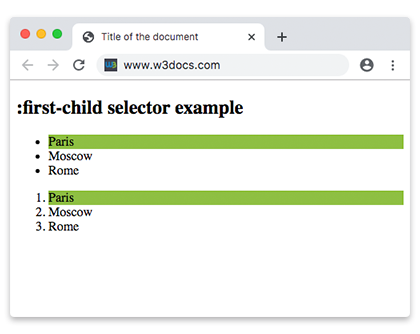
li:first-child evidenzia il primo elemento di ogni elenco. Poiché sia <ul> che <ol> reimpostano il conteggio dei figli, il primo <li> di ciascuno ottiene il colore di sfondo.
Altro esempio di codice CSS :first-child
<!DOCTYPE html>
<html>
  <head>
    <title>Title of the document</title>
    <style>
      li:first-child {
        background: #8ebf42;
      }
    </style>
  </head>
  <body>
    <h2>:first-child selector example</h2>
    <ul>
      <li>Paris</li>
      <li>Moscow</li>
      <li>Rome</li>
    </ul>
    <ol>
      <li>Paris</li>
      <li>Moscow</li>
      <li>Rome</li>
    </ol>
  </body>
</html>Con il tag <ol>
Due elementi <ol> si trovano affiancati in <body>. Solo il primo è il primo figlio di <body>, quindi solo esso riceve il colore di sfondo.
Esempio del selettore :first-child con il tag HTML ol
<!DOCTYPE html>
<html>
  <head>
    <title>Title of the document</title>
    <style>
      ol:first-child {
        background: #8ebf42;
      }
    </style>
  </head>
  <body>
    <ol>
      <li>London</li>
      <li>Paris</li>
      <li>Rome</li>
    </ol>
    <ol>
      <li>London</li>
      <li>Paris</li>
      <li>Rome</li>
    </ol>
  </body>
</html>Con il tag <em>
p em:first-child punta a un <em> solo quando è il primo figlio di un <p>. In ciascun paragrafo seguente il primo <em> viene dopo le parole "Here is a", quindi non è il primo figlio — la regola non corrisponde a nulla. Questa è un'illustrazione intenzionale dell'insidia descritta sopra.
Esempio del selettore :first-child con il tag HTML em
<!DOCTYPE html>
<html>
  <head>
    <title>Title of the document</title>
    <style>
      p em:first-child {
        background: #82b534;
      }
    </style>
  </head>
  <body>
    <h2>:first-child selector example</h2>
    <article>
      <p>Here is a <em>some</em> text. This is a <em>example</em>.</p>
      <p>Here is a <em>some</em> text. This is a <em>example</em>.</p>
      <p>Here is a <em>some</em> text. This is a <em>example</em>.</p>
    </article>
  </body>
</html>Con il tag <ul>
:first-child funziona a ogni livello di annidamento. Il primo elemento dell'elenco esterno e il primo elemento dell'elenco annidato corrispondono entrambi a ul li:first-child.
Esempio del selettore :first-child con il tag HTML ul
<!DOCTYPE html>
<html>
  <head>
    <title>Title of the document</title>
    <style>
      ul li {
        color: blue;
      }
      ul li:first-child {
        color: #8ebf42;
        font-weight: bold;
      }
    </style>
  </head>
  <body>
    <h2>:first-child selector example</h2>
    <ul>
      <li>List Item 1</li>
      <li>List Item 2</li>
      <li>
        List Item 3
        <ul>
          <li>List Item 3.1</li>
          <li>List Item 3.2</li>
          <li>List Item 3.3</li>
        </ul>
      </li>
    </ul>
  </body>
</html>Supporto browser
:first-child è supportato in tutti i browser moderni e funziona in Internet Explorer 9 e versioni successive. Fa parte di CSS Level 2 e non ha subito modifiche in Selectors Level 3 e Level 4, quindi può essere usato senza alcun prefisso vendor.
Selettori correlati
:last-child— stilizza l'ultimo elemento di un gruppo:first-of-type— il primo elemento di un dato tipo, indipendentemente da ciò che lo precede:only-child— corrisponde a un elemento privo di fratelli:nth-child()— corrisponde per posizione con una formula (:first-childequivale a:nth-child(1))