Proprietà CSS column-rule-color
La proprietà CSS column-rule-color specifica il colore della riga divisoria tra le colonne. Scopri esempi e imposta i tuoi colori.
La proprietà CSS column-rule-color imposta il colore della riga divisoria (la linea di separazione) disegnata tra le colonne di un layout multi-colonna. La riga stessa viene creata con column-rule-style; se non è impostato alcuno stile, la riga — e quindi il suo colore — non viene visualizzata.
Questa proprietà ha effetto solo sugli elementi multicolonna, ovvero gli elementi disposti in colonne tramite column-count o column-width (oppure la proprietà abbreviata columns). È una delle proprietà CSS3.
Il colore della riga può essere impostato insieme alla sua larghezza e al suo stile tramite la proprietà abbreviata column-rule, che è il modo comune per dichiarare tutti e tre i valori contemporaneamente.
Per impostazione predefinita il valore è currentColor, quindi il colore della riga non impostato corrisponde al color del testo dell'elemento. Puoi trovare i colori web nella nostra sezione Colori HTML e scegliere il tuo con lo strumento Color Picker.
Quando usarla
Usa column-rule-color quando vuoi che la riga divisoria tra le colonne sia diversa dal colore del testo — ad esempio una riga grigia sottile tra testo corpo scuro, oppure una linea con il colore del brand. Poiché è puramente decorativa, la riga non occupa spazio nel layout (si trova all'interno del column-gap), quindi cambiarne il colore non provoca mai il riflusso del contenuto.
| Valore iniziale | currentColor |
|---|---|
| Si applica a | Elementi multicolonna. |
| Ereditabile | No. |
| Animabile | Sì. Il colore della riga è animabile. |
| Versione | CSS3 |
| Sintassi DOM | object.style.columnRuleColor = "#666"; |
Sintassi
Sintassi della proprietà CSS column-rule-color
column-rule-color: color | initial | inherit;Puoi passare qualsiasi colore CSS valido: un nome di colore, un codice esadecimale oppure un valore rgb(), rgba(), hsl() o hsla().
Esempi
Valore con nome di colore
Esempio della proprietà CSS column-rule-color con valore lightgreen
<!DOCTYPE html>
<html>
  <head>
    <title>Title of the document</title>
    <style>
      div {
        column-count: 3;
        column-gap: 20px;
        column-rule-style: dashed;
        column-rule-color: lightgreen;
      }
    </style>
  </head>
  <body>
    <h1>The column-rule-color example</h1>
    <div>
      Lorem Ipsum is dummy text of the printing and typesetting industry. Lorem Ipsum has been the industry's standard dummy text ever since the 1500s when an unknown printer took a galley of type and scrambled it to make a type specimen book. It has survived not only five centuries, but also the leap into electronic typesetting, remaining essentially unchanged. It was popularised in the 1960s with the release of Letraset sheets containing Lorem Ipsum passages, and more recently with desktop publishing software like Aldus PageMaker including versions of Lorem Ipsum.
    </div>
  </body>
</html>Ricorda di impostare anche column-rule-style — senza uno stile (come solid, dashed o double), la riga non viene disegnata e il suo colore non ha alcun effetto visibile.
Valore esadecimale
Esempio della proprietà CSS column-rule-color con valore esadecimale
<!DOCTYPE html>
<html>
  <head>
    <title>Title of the document</title>
    <style>
      div {
        column-count: 3;
        column-gap: 40px;
        column-rule-style: solid;
        column-rule-color: #8ebf42;
      }
    </style>
  </head>
  <body>
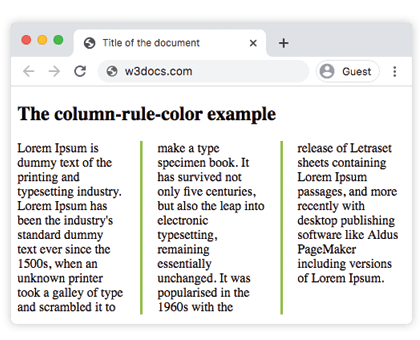
    <h1>The column-rule-color example</h1>
    <div>
      Lorem Ipsum is dummy text of the printing and typesetting industry. Lorem Ipsum has been the industry's standard dummy text ever since the 1500s, when an unknown printer took a galley of type and scrambled it to make a type specimen book. It has survived not only five centuries, but also the leap into electronic typesetting, remaining essentially unchanged. It was popularised in the 1960s with the release of Letraset sheets containing Lorem Ipsum passages, and more recently with desktop publishing software like Aldus PageMaker including versions of Lorem Ipsum.
    </div>
  </body>
</html>Risultato:
Valore RGB
Esempio della proprietà CSS column-rule-color con valore RGB
<!DOCTYPE html>
<html>
  <head>
    <title>Title of the document</title>
    <style>
      div {
        column-count: 3;
        column-gap: 40px;
        column-rule-style: double;
        column-rule-color: rgb(234, 211, 21);
      }
    </style>
  </head>
  <body>
    <h1>The column-rule-color example</h1>
    <div>
      Lorem Ipsum is dummy text of the printing and typesetting industry. Lorem Ipsum has been the industry's standard dummy text ever since the 1500s, when an unknown printer took a galley of type and scrambled it to make a type specimen book. It has survived not only five centuries, but also the leap into electronic typesetting, remaining essentially unchanged. It was popularised in the 1960s with the release of Letraset sheets containing Lorem Ipsum passages, and more recently with desktop publishing software like Aldus PageMaker including versions of Lorem Ipsum.
    </div>
  </body>
</html>Valore HSL
Esempio della proprietà CSS column-rule-color con valore HSL
<!DOCTYPE html>
<html>
  <head>
    <title>Title of the document</title>
    <style>
      div {
        column-count: 3;
        column-gap: 30px;
        column-rule-style: solid;
        column-rule-color: hsl(351, 97%, 57%);
      }
    </style>
  </head>
  <body>
    <h1>The column-rule-color example</h1>
    <div>
      Lorem Ipsum is dummy text of the printing and typesetting industry. Lorem Ipsum has been the industry's standard dummy text ever since the 1500s, when an unknown printer took a galley of type and scrambled it to make a type specimen book. It has survived not only five centuries, but also the leap into electronic typesetting, remaining essentially unchanged. It was popularised in the 1960s with the release of Letraset sheets containing Lorem Ipsum passages, and more recently with desktop publishing software like Aldus PageMaker including versions of Lorem Ipsum.
    </div>
  </body>
</html>Valori
| Valore | Descrizione | Prova |
|---|---|---|
| color | Imposta il colore della riga. Si possono usare nomi di colore, codici esadecimali, rgb(), rgba(), hsl(), hsla(). | |
| initial | Imposta la proprietà al suo valore predefinito. | |
| inherit | Eredita la proprietà dall'elemento genitore. |
Proprietà correlate
La riga delle colonne è controllata da tre proprietà longhand, solitamente combinate con la proprietà abbreviata:
column-rule— abbreviazione per impostare stile, larghezza e colore in una volta sola.column-rule-style— lo stile della linea; necessario affinché la riga (e il suo colore) vengano visualizzati.column-rule-width— lo spessore della riga.
Vedi anche column-gap, che definisce lo spazio in cui si trova la riga, e la proprietà abbreviata columns per costruire il layout multi-colonna stesso.